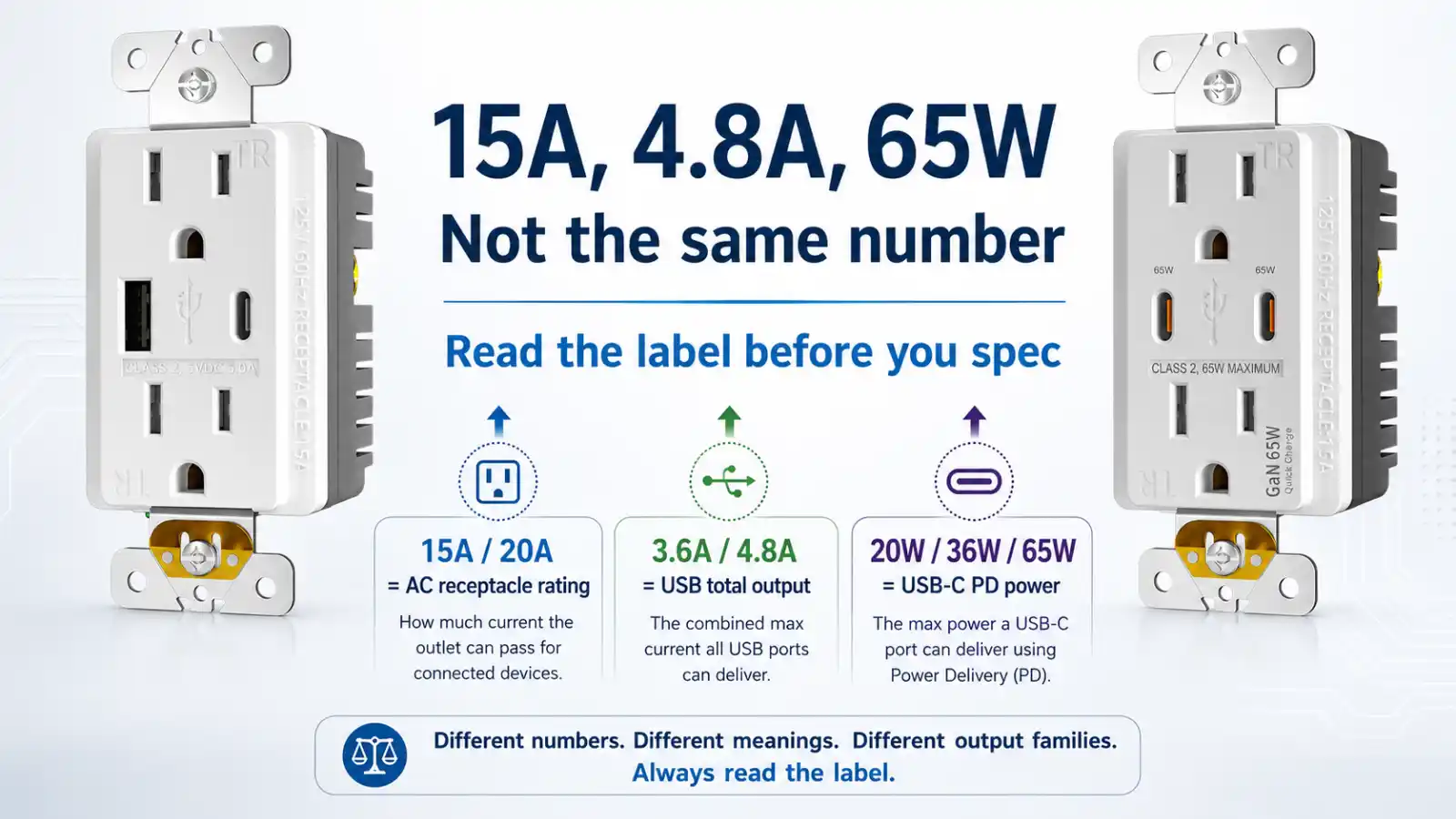
A single USB outlet can read 15A, 4.8A, and 65W on the same spec sheet, and those three numbers answer three different questions. We build UL/cUL-listed USB receptacles for North America, and a buyer who reads the wrong number off the label specs the wrong outlet. We fielded that exact mix-up in one June 2026 WhatsApp batch.
In June 2026, about five RFQs landed in our WhatsApp. Three opened with “what’s PD20, what’s PD65, what is that?” Two asked whether each port puts out 4.8A. None of those is a careless question. The label invites every one of them.
So when a buyer asks how many amps a USB outlet is, the honest reply starts with a question back: which amp — the AC side, or the USB side?
| The number on the label | Which side it describes | Read it as |
|---|---|---|
| 15A / 20A | AC receptacle | the circuit and plug rating, under UL 498 |
| 3.6A / 4.8A | USB charging at 5V | total charging current, shared across the ports |
| 20W / 36W / 65W | USB-C PD charging | charging power set by the device and cable, not a 5V amp number |
The 15A on the face is not the USB number
The biggest number on the face is the one buyers misread most. 15A, sometimes 20A — that is the AC receptacle. It rates the slots you plug a lamp or a vacuum into, and it sets the circuit the device belongs on. Receptacle rating and circuit rating don’t even have to match each other, which is a separate rabbit hole. For a USB spec the part that counts is short: 15A describes the power coming in. It says nothing about the charging going out.
The charging side is a separate thing with a separate listing. The receptacle is evaluated to UL 498. The USB charging output is a Class 2 power unit under UL 1310. Two listings, one faceplate. A real outdoor USB receptacle on the market prints “15A” and “5 Amps of shared charging” on the same label and lists to both standards — the two numbers sit inches apart and measure unrelated things.
A PO line that just says “15A USB outlet” has named the receptacle and left the charging output blank.
Three numbers, three different questions
Drop the AC number and look at what’s left. On our line the charging side speaks two languages.
The older one counts amps at 5 volts: 3.6A and 4.8A. Those two came out together — there is no 4.2A sitting between them, however often spec sheets seem to imply a tidy ladder.
The newer one counts watts: PD 20W, 36W, 65W. We turned PD on in 2022. Every PD unit carries a USB-C port, because PD runs over USB-C. There is no PD model with two USB-A ports.
| USB output | Stated in | Faces it ships on |
|---|---|---|
| 5V / 3.6A | amps (total) | A/A, A/C, C/C |
| 5V / 4.8A | amps (total) | A/A, A/C, C/C |
| PD 20W | watts | A/C, C/C |
| PD 36W | watts | A/C, C/C |
| PD 65W | watts | A/C, C/C |
Read down that table and the dividing line is the C port. Every watt-rated row needs one. A dual-A face stays in the 5V column.
What a 4.8A face gives each port
Two of those June RFQs asked whether each port puts out 4.8A.
A 4.8A label is the total. It is the size of the pool, not what each port hands out. One device on one port can pull up to the rated single-port figure. Put two devices on at once and the 4.8A divides between them — each port lands around 2.1 to 2.4A.
We set 4.8A as the ceiling and run the ports under it by design. A unit pinned at its absolute maximum all day runs hot and ages early. The gap between the label and the everyday load is deliberate, so the parts aren’t redlined every time someone charges two phones overnight. That headroom is a choice, and it is the answer those RFQ customers were actually looking for.
The 3.6A version works the same way: two devices, roughly 1.8A each.
PD changes the math, not the rule. A 65W unit gives a single device the whole 65W; load both ports hard and it shares, landing near 32W and 32W, allotted on the fly. The number on the face is the total in every case.
This trips up enough people that one shopper, worn down by contradictory replies under a product listing, emailed the manufacturer to settle whether the ports were independent. The answer came back that the current splits, half to each port, when both are in use. The label hadn’t said so.
For the same behavior diagnosed from the return side — a customer swearing one port is dead when it is only sharing — we walked through it in USB Outlet One Port Not Working / Won’t Charge: What a Buyer Should Check Before Returning.
Why 3.6A and 65W don’t sit on the same ruler
Amps and watts measure different things, so 3.6A and 65W can’t be ranked against each other head to head. Multiply volts by amps and you get watts — 5V at 3A is 15W. A 5V/4.8A unit tops out near 24W total. A PD 65W port can hand a single device far more, because PD negotiates higher voltages instead of pushing more current at 5 volts.
That gap is also why an older 5V outlet charges a modern laptop slowly while a 65W PD outlet keeps up. We took that apart in Why Your 65W USB-C Wall Outlet Charges Slower Than Expected.
Same label, different read by market
The right number to read depends on where the outlet goes.
A hotel nightstand takes two phones at once on most nights. The figure that matters there is the both-loaded one — what each port still delivers with the other in use — not the single-port headline. A 4.8A face holding 2.1 to 2.4A per port covers two phones comfortably. It will not fast-charge a laptop, and a hotel buyer rarely needs it to.
An office desk or a dorm room mixes laptops and tablets into that. PD earns its place there: a 65W USB-C port runs a laptop while a 5V/4.8A face cannot reach it. Where two people share one desk or one nightstand, that pushes toward a dual USB-C face at 65W, so neither side drops to a trickle when both are loaded. If the brief mentions laptops at the desk, the spec moves to the watt column — and so does the choice between keeping a USB-A port or going dual, since a PD face has to carry at least one C
A kitchen or bathroom flips the order. The AC side leads — 15A or 20A, GFCI, and the box depth to fit a deeper USB body. The USB output comes second there, after the location’s code requirements are settled.
Retail packaging is its own problem. A pack that crowds 15A, 4.8A, and 24W into one line, with no cue to which number is which, produces exactly the questions that reach our WhatsApp — and, a step later, the returns.
On our own shipments the A/C face moves the most, across every market we sell into. Before 2020 the dual-A units shipped heaviest; I’d have to pull the full numbers to say by how much. That is our record, not a read on the wider market.
Writing the amps onto a PO line that holds up
A line that comes back clean keeps the three axes apart instead of stacking them:
- the AC rating on its own — 15A or 20A, with TR, and GFCI where the location calls for it
- the USB output in its own units — 5V/3.6A, 5V/4.8A, or PD 20W / 36W / 65W
- the face configuration — A/A, A/C, or C/C
- the both-ports-loaded figure, when two devices will share the outlet
Two specs head off a whole round of back-and-forth. Any PD line needs a USB-C port, so “PD 65W, dual USB-A” can’t be built. And our GFCI + USB combo runs 4.8A only — there is no PD version of that pairing on our line.
What we can put numbers to, and what we can’t
We make the device and we test it, so we can give a buyer the real USB receptacle amps under load, the tier that fits a given market, and a PO line that keeps the AC rating separate from the USB output.
We don’t wire the room or choose the branch circuit, and we don’t sell at the retail counter. When a spec question turns into a code question — what an inspector will accept on a particular circuit — that call belongs to the installer and the AHJ. We point to the listing rather than rule on it.
FAQ
How many amps is a USB outlet?
The label carries two answers. The AC receptacle is rated 15A or 20A — that is the circuit and the plug. The USB charging side is 3.6A or 4.8A at 5 volts, or rated in watts (20W up to 65W) when it has Power Delivery. The first number is the circuit; the second is what charges your phone.
Does a 4.8A USB outlet give 4.8A to each port?
No. 4.8A is the total. With two devices plugged in, each port gets around 2.1 to 2.4A.
Is 4.8A enough to charge a laptop?
A 5V/4.8A outlet tops out near 24W total, which covers phones and tablets well. A laptop needs Power Delivery — look for a 65W USB-C outlet instead.
What does PD mean on a USB outlet?
Power Delivery: the USB-C standard that negotiates higher voltages for higher-wattage charging. Every PD outlet has a USB-C port.
Will a high-amp USB outlet damage my phone?
No. The amp figure is a ceiling, not a push. Your device draws only what it needs, and both the device and the outlet carry protection circuits that hold the current in range.
Sources
- UL 498, Attachment Plugs and Receptacles — official scope page for receptacles and related branch-circuit connection devices:
UL 498 Scope - UL 1310, Class 2 Power Units — official scope page for Class 2 power supplies and battery chargers:
UL 1310 Scope - IAEI, Receptacles with USB Chargers — discussion of 2017 NEC 406.3(F) / 406.6(D) and the UL 498 / UL 1310 relationship for USB charger receptacles:
IAEI USB Charger Receptacle Discussion - USB-IF, USB Power Delivery — official overview of higher-power USB-C charging through Power Delivery:
USB Power Delivery Overview - Leviton USB wall outlet category — public product category showing 24W (4.8A) USB receptacles and PD USB wall outlet tiers:
Leviton USB Wall Outlets - Home Depot product page — public example showing a single product title carrying 15 Amp, 24-Watt, and 4.8 Amp language together:
Leviton 15 Amp / 24 Watt / 4.8 Amp Product Listing - Family Handyman, 15-Amp vs. 20-Amp Outlets — background reference for receptacle rating versus circuit rating:
15-Amp vs. 20-Amp Outlets - Regency Supply, How to Choose a USB Charging Receptacle — supporting explanation of volts × amps = watts and total wattage versus output labeling:
How to Choose a USB Charging Receptacle
Related reading
- USB Outlet One Port Not Working / Won’t Charge: What a Buyer Should Check Before Returning
- Why Your 65W USB-C Wall Outlet Charges Slower Than Expected
- USB-A/C Outlet vs Dual USB-A Outlet: When Keeping the A Port Is the Right Call
- Why 65W Dual USB-C Wall Outlets Are Gaining Ground in Hotels and Offices
Before the spec is sent
Browse the USB wall outlet category.
Questions on which number to put on the spec? Talk to us.