On our GFCI line, the light that flashes during a self-test is green, where plenty of other units flash red for the same job. That one difference — a color — has been enough for a buyer to ask whether our device even has self-test. We build these receptacles; we don’t wire them into anyone’s wall. What a manufacturer can actually help a buyer with here is narrower than it sounds: reading a light against the right model before a unit gets called defective and sent back.
A red light, a green light, a blink, a dark face — none of those is a verdict on its own. The same signal carries a different meaning from one model to the next, and a buyer reading it by the habits of a different brand can return a working device or keep using a compromised one. Here is how the signals sort out, and where the light stops being able to tell you anything.
The same light, model by model
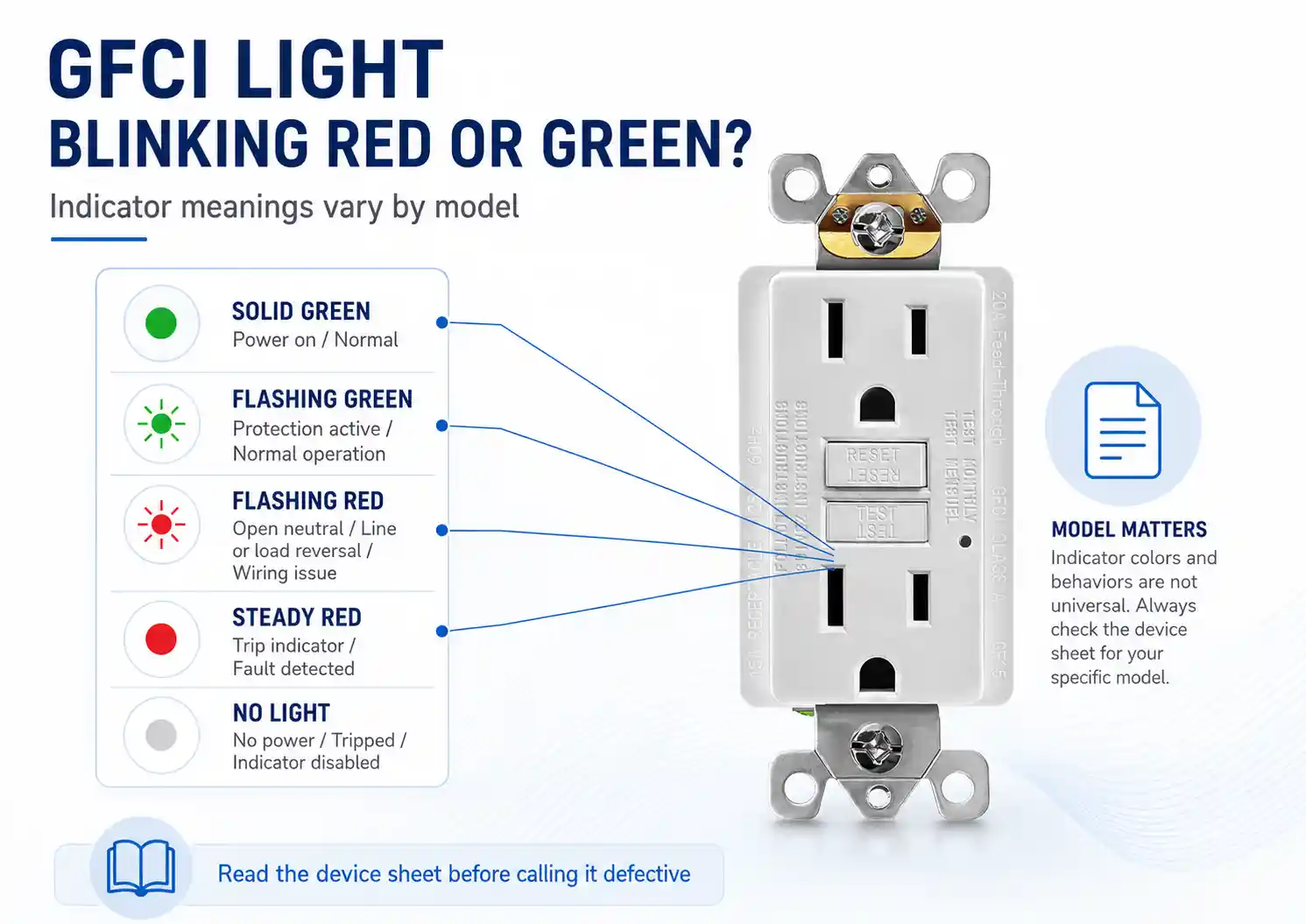
The light on a GFCI is a status indicator, and the scheme behind it is set by the maker, not by a shared color code. UL 943 has required self-test GFCIs to indicate their status visually or audibly since 2015, but it doesn’t fix which color means what. So the same observation lands differently depending on whose device is in the box.
| Signal | One scheme reads it as | A different scheme reads it as | What the light alone doesn’t tell you |
|---|---|---|---|
| Solid green | Powered, passed self-test, working | On a two-light unit, just “status OK” while a separate light handles trips | Whether the face has output, or LINE/LOAD is correct |
| Green, but no power at the face | Device believes it’s fine | A wiring or reset condition upstream | Whether LINE has power and the reset is in |
| Solid red | Fault or end-of-life warning | A steady “device tripped / fault present” state that resets normally | Whether red means fault, trip state, or replacement on this model |
| Quick red flash at power-up | A self-test running, normal | Nothing — a green-self-test unit never shows it | That anything is wrong; it may be routine |
| Flashing green | A self-test running | On a red-self-test habit, mistaken for “no self-test feature” | That the feature is present, just a different color |
| Amber / yellow | A trip or correct-wiring indicator | A failed self-test or replace warning | Which of those this model means |
| No light | Not powered | Normal operation, on designs that stay dark when healthy | Whether it’s off, tripped, or dark-when-normal by design |
| Red that won’t clear | End of life — replace | A persistent fault or active ground fault on the circuit | Whether it’s the device or the circuit holding it |
Two rows in that table point in opposite directions depending on the model. Those are the two that send good units back.
A dark light is the trap
On some designs, a GFCI that’s working normally shows no light at all — the dark face is the healthy state, and a lit one would be the exception. On other designs, a dark light means the device has tripped and cut power, or simply isn’t energized. On our line, no light means no power reached it.
So a return tagged “the light is dead, so the unit must be dead” can be describing a device doing exactly what its own sheet says. Send that one back and the bin fills with units that were never the problem, while the freight runs both ways and the actual condition — no power at the box, or a different brand’s dark-when-normal design — stays in the field. The dark face is the signal people are most confident reading, and it’s the one whose meaning flips hardest from one model to the next.
A blinking red isn’t a replacement order
A red flash when power first comes on, or right after a reset, can be the self-test running. On the schemes that use red for it, that flash is routine, not a warning. Red earns a replacement when it won’t clear — a steady red that survives a TEST and RESET, or a red that keeps flashing after the circuit is clean, is the end-of-life signal telling you the unit is done.
The color that does the self-test job is where buyers get crossed up. In 2023 a wholesaler in New York, a new account who had been buying from a well-known US brand, ran our self-test samples and asked whether they had self-test at all, because the light never flashed red. Ours flashes green. I sent him the bench self-test video, and that settled it — the feature was there the whole time, the color just wasn’t the one he had been trained to look for. Nothing was wrong with the device or with his read; the light was speaking a different dialect than the one on his shelf.
If the report is a green light with no power at the face instead, that’s a different branch — a LINE/LOAD or reset condition rather than an indicator question — and it’s worked through in reading a “half hot” GFCI return.
Green still has to be read with the reset state
A solid green usually means powered and holding, but green read in the wrong state misleads. On units that show a solid green while the reset button is sitting out and the load is off, that green is flagging reversed LINE and LOAD — not a healthy outlet. Green confirms the device has power and a passed self-test. It doesn’t confirm the face has output, and it doesn’t confirm the wiring is right. Those still take a load check and a look at the reset.
What the bench settles, and what the sheet in the box decides
Every unit we ship runs a 12-hour vibration cycle that stands in for the shaking of transport, then each one is instrument-tested — indicator function, trip threshold, TEST and RESET, the reverse line/load response, and whether the reset holds — with a person checking the housing and the button. That proves the light on our device does what our sheet says it does.
It does not reach the other variables. I can’t tell from a photo of a blinking light which model’s sheet it’s being read against, and a bench can’t see whether the LINE and LOAD in someone’s box were landed correctly. We build the device and we test its light against our own documentation; we don’t read another brand’s scheme, and we don’t wire the wall. When a return reaches us as only “the light is red” or “the light is dead,” we ask which model’s sheet it’s being read against, and the unit goes to the bench only after TEST, RESET, and LINE-side power are confirmed in the field.
A device whose indicator already passed instrument testing is the least likely reason a light is reading wrong on a wall a continent away.
Before you call it end of life — and before the PO closes
The reads that resolve without a return are quick. Let a power-up flash settle before you judge it. Press TEST, then RESET, and clear the circuit before you treat a red as end of life — a red that clears after you remove the load was pointing at the circuit, not the device. Confirm LINE-side power before a dark light becomes a defect.
For a purchase order, the wording that prevents the misread is the indicator scheme itself: which color is power, which is a fault, which is self-test, whether the device carries one light or two, and what it does at end of life. A line that says only “self-test GFCI, 15A” leaves the light’s language unstated, and the light then gets read by whatever brand the buyer saw last — which is how a working sample comes back with a question on it. A datasheet that spells the scheme out, and an instruction sheet that ships in the box, are what keep the next reader on the right dialect. The same split between self-test, TR, and the other datasheet fields applies here: the indicator is one more field that has to be stated, not assumed.
FAQ
What does a red light on a GFCI outlet mean?
It depends on the model, which is the whole problem. On some units a red light is a fault or an end-of-life warning; on others a brief red flash at power-up is just the self-test running, and a steady red is the normal “correct wiring” indicator. Check the sheet for that specific device before reading red as a failure. On our line, a steady red is a fault, and a red that won’t clear is end of life.
Does no light mean the GFCI is bad?
Not necessarily. Some GFCIs stay dark during normal operation, so no light is the healthy state; on our line, no light means no power reached the device. Confirm power at the box before calling it dead.
Why is my GFCI blinking red?
A red flash at power-up or after a reset can be the self-test cycle, which is normal on schemes that use red for it. A red that keeps flashing after you press TEST and RESET and clear the load is the end-of-life signal, and that unit should be replaced.
Do all GFCI brands use the same red and green meanings?
No, and this is the single most useful thing for a buyer to know before switching suppliers. Self-test indication can be green on one line and red on another. A dark light can mean “healthy” on one design and “no power” on another. A two-light unit splits status and trip across two colors, while a single-light unit carries everything on one. The word “GFCI” stays the same across a supplier change, but the light’s language doesn’t, so the indicator scheme belongs on the datasheet and in the box — not in the buyer’s memory of the last brand they stocked.
Sources
- UL 943, Standard for Ground-Fault Circuit-Interrupters — standard context for GFCI self-test / auto-monitoring requirements and status indication; the standard context does not create a single universal red/green color code:
UL 943 Standard Information - Leviton GFCI-USB Charging Receptacle instruction sheet PK-A3410-10-00-2B-M-X1 — LINE/LOAD identification, green/red status indicator, lockout behavior, solid green when powered from LINE side and working correctly, solid/flashing red as a condition to check, and possible red flash at power-on and reset:
Leviton GFCI Instruction Sheet - Leviton Product Support, GFCI Line/Load Reversal — explains that line wires bring power from the electrical panel to the GFCI, load wires carry power downstream, and line/load reversal can prevent normal operation and protection:
Leviton GFCI Line/Load Reversal - Leviton Product Support, What to Do When Your GFCI or AFCI Isn’t Working — line/load reversal as a support-path cause of a GFCI that will not reset or deliver power:
Leviton GFCI or AFCI Isn’t Working - Eaton slim GFCI instruction sheet — a “Red” color light used as the End-of-Life indicator (replace if flashing or continuously lit), and a yellow Correct-Wiring / Trip indicator that comes on when the device is tested or tripped; replacement required if the end-of-life red light is flashing or lit continuously:
Eaton Slim GFCI Instruction Sheet - Eaton Slim GFCI instruction sheet EIS-0297-EFS — TEST/RESET behavior, LINE/LOAD reversal lockout, downstream GFCI Protected sticker placement, and end-of-life note when a tripped GFCI can no longer be reset:
Eaton Slim GFCI Testing and Lockout Guidance
Related reading
Before the PO line is closed
Browse the GFCI receptacle line for self-test, TR, and WR options.