Last updated: May 2026 · By the ShengYu Engineering Team
A 65W USB C outlet is usually the first thing people blame when a laptop or phone charges slowly. Sometimes that is fair. More often, the outlet is doing exactly what it is allowed to do, while the cable, the device, the second USB-C port, or the battery-management system is setting the actual speed.
The problem is that “65W” sounds more complete than it really is. For a hotel room, office desk, or student housing unit, that number does not explain shared-port behavior, cable rating, Samsung charging labels, or how a laptop behaves when it is already warm or under load.
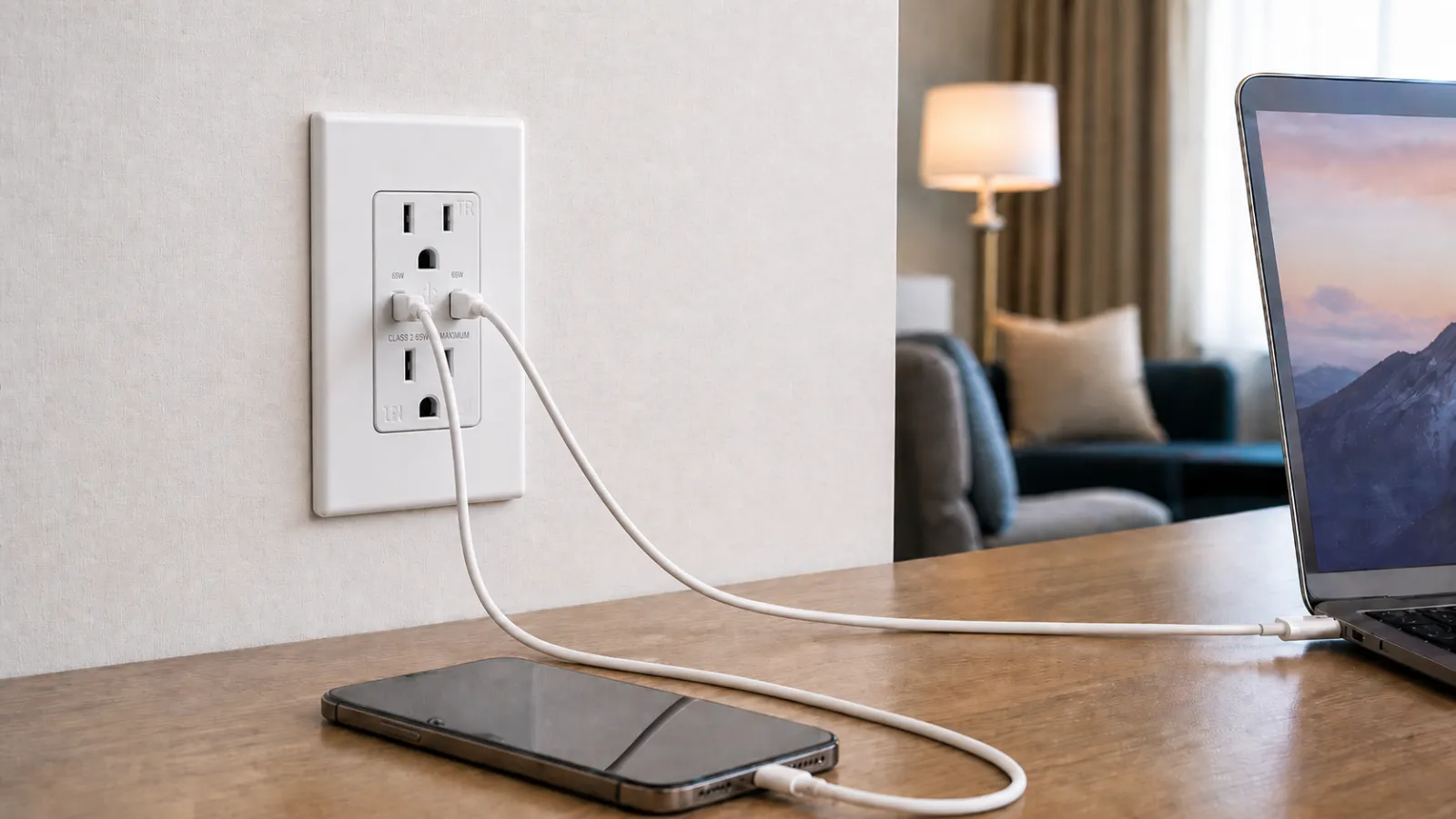
On a production unit our team bench-tested at 25°C with the device idle, a 14-inch MacBook Pro drew 65W from one USB-C port at 20% battery. Plugging a phone into the second port pulled the MacBook reading down to about 30W. The output budget got divided. Nothing about the receptacle had changed; the visible charging speed had.
What the 65W Label Does Not Tell You
A spec sheet that says “65W dual USB-C outlet” gives the headline number. It does not say what happens when both USB-C ports are loaded, whether the full output is available on one port only, how the two ports share power, or whether Samsung-specific charging expectations are covered.
For a USB-C wall outlet, the wattage describes the maximum USB-C output available under USB Power Delivery negotiation when the connected device requests a matching profile. A phone may request far less. A tablet sits in a middle range. A laptop may accept 65W and still charge slowly under load or near full battery.
The ShengYu 15A GaN receptacle referenced here is UL/cUL listed for North American project use. Its USB side supports up to 65W from one USB-C port, with USB Power Delivery up to 65W and QC up to 18W. PPS is not part of the protocol stack on this unit. Buyers targeting Samsung Super Fast Charging should treat that as a known constraint, not a detail to discover after install.
A useful purchase specification states the AC rating, the maximum total USB output, the single-port USB-C output, the supported charging protocols, and the dual-port behavior. Without those details, “65W” is a headline. And there is one more you need to know, pls see USB wall outlet and wall charger serve different roles.
For the project rationale behind higher-output USB-C receptacles, the 65W GaN USB-C wall outlet project guide explains why hotels, offices, and apartment renovations are moving away from loose plug-in chargers.
Two USB-C Ports Do Not Mean Two 65W Outputs
The dual-port misunderstanding is easy to miss in a product schedule. Two USB-C ports look like two independent charging points, but the USB power budget behind them is shared.
On the unit we tested earlier, the single-port MacBook reading of 65W dropped to about 30W once the phone joined the second port. The other port took the rest of the budget. That is the design behavior — one port can use the full USB output when alone, two active ports divide it.
A guest charging a laptop and a phone at the same desk should expect slower laptop charging than single-port use. For hotels and offices, that detail belongs in the spec. Dual-device charging is not an edge case in a room with one desk or one bedside outlet. If the supplier specification only says “dual USB-C, 65W,” ask how the output is shared when both ports are active.
A Cable Can Make a Good Outlet Look Slow
USB-C cables look interchangeable. They are not.
A cable that works for basic phone charging is often not the right cable for laptop-class charging. The wall outlet is capable of higher output; the cable becomes the limiting part of the chain. End users report that “the USB-C outlet is slow” because the outlet is the fixed object in the room, while the cable they brought from home rarely gets questioned.
For project buyers, the cable decision should not be left to whatever the guest or tenant happens to bring. If the room kit is expected to support laptop-class charging, the supplied USB-C cable should be rated for the intended power level. A generic phone cable will still charge the device. The system will just negotiate down to whatever that cable can carry.
Cable length adds a smaller effect — longer cables introduce more resistance and a small voltage drop under load. On a normal desk setup, cable rating is the bigger issue, but a long, thin, unmarked cable will compound the problem.
PD Negotiation Happens Before the Battery Percentage Moves
USB Power Delivery is a negotiation between the source, the cable, and the device. The outlet advertises what it can provide. The device chooses what it can use. The cable has to be suitable for the requested power level. Charging speed is the result of that agreement, not the rating printed on the outlet alone.
For mainstream laptops, tablets, and phones, standard USB-C PD behavior is enough. A MacBook, iPad, iPhone, Chromebook, or USB-C Windows laptop will charge from a 65W source — though not always at its fastest possible rate.
The device then makes its own decisions. Battery percentage does not move in a straight line from 0 to 100. Devices draw more power when the battery is low and reduce charging current as the battery fills. Heat, screen use, processor load, and battery-protection logic all change the visible result.
Samsung Is the Easy Place to Overpromise
Samsung is where the wording gets risky. A buyer sees “65W” and assumes a Samsung phone should show the fastest charging label. Samsung’s charging language does not work that way.
Samsung’s own 25W USB-C Fast Charging Wall Charger page describes Super Fast Charging as using Power Delivery and states that Super Fast Charging requires a USB PD 3.0 compatible device that supports Direct Charging. Devices that do not meet that requirement charge at a slower rate than Super Fast Charging speed.
For this 65W in-wall unit, PPS is not part of the stated protocol support. A Samsung Galaxy phone can still charge from it. The Super Fast Charging screen label may not appear unless the exact phone, cable, and outlet have been tested together.
Listing and charging-label expectations are separate questions. A receptacle can be properly listed, correctly installed, and suitable for many USB-C devices, while a Samsung user still expects a screen label that belongs to a different charging behavior.
The Same Outlet Will Not Behave the Same on Every Device
MacBook Air, iPad, iPhone, Samsung Galaxy, and USB-C Windows laptops all use the same physical USB-C connector, but they ask for power differently.
A MacBook Air pairs reasonably well with a 65W wall source for desk or guest-room use. A 14-inch MacBook Pro will charge but should not be promised fast-charge behavior — Apple documents 96W or higher for that. A 16-inch MacBook Pro can also charge from a 65W source, but Apple’s fast-charge combinations call for 140W via PD 3.1, which makes a 65W in-wall outlet a top-up source rather than a fast charger for those models.
An iPhone takes what it takes. A 65W wall outlet has more source capacity than any current iPhone will use; battery state, model, cable, and temperature set the actual draw.
Samsung adds the screen-label question. A Galaxy phone may charge from the outlet, but whether it displays Super Fast Charging depends on PPS support — covered in the previous section.
USB-C Windows laptops and Chromebooks vary by manufacturer. Some are comfortable on standard PD sources. Others expect higher-wattage adapters or vendor-specific behavior. Check the input requirement on the device label or the included charger before specifying a receptacle for a school or office that runs on those laptops.
The Spec Sheet Should Say More Than “65W USB-C”
Most slow-charging complaints in finished projects trace back to specifications written without enough detail. A buyer may think “65W USB-C outlet” is specific. For a real project, it leaves too much open.
Five questions that should be answered before the PO is released:
- What is the maximum total USB output? For this unit, the total USB output is 65W.
- What happens when both USB-C ports are used? The two ports share the available output.
- What cable should be supplied or recommended? Use a USB-C cable rated for the intended charging load, especially for laptop-class charging.
- What should Samsung users expect? Do not promise Super Fast Charging unless the exact phone, cable, and outlet have been tested together.
- What is the listing and installation context? Verify UL/cUL listing, AC rating, wall box fit, and local installation requirements before releasing project quantities.
That level of detail can feel excessive during bidding. It feels less excessive after a property opens and the front desk starts hearing that the new USB-C outlets are slow.
The 15A 65W GaN dual USB-C receptacle fits projects that need a higher-output built-in USB-C charging point while keeping two standard AC receptacles available. For buyers comparing USB-A, USB-C, and mixed configurations across a wider device schedule, the USB wall outlets category is the better starting point.
Frequently Asked Questions About 65W USB-C Wall Outlet Slow Charging
Why is my 65W USB-C wall outlet only charging at 30W?
The outlet is sharing its USB power budget with a second device. On a 14-inch MacBook Pro tested at 20% battery and 25°C, single-port draw was 65W; with a phone added on the second port, the MacBook reading dropped to about 30W. Unplug the second device and watch whether the speed comes back. If it doesn’t, the next thing to check is the cable rating.
Can a 65W USB-C wall outlet charge a MacBook Pro?
Yes — but it should not be sold as a MacBook Pro fast-charge source. Apple documents 96W or higher for fast-charging the 14-inch MacBook Pro and 140W via PD 3.1 for the 16-inch MacBook Pro. A 65W wall outlet will keep either model topped up at idle and charge through normal use, but it does not meet Apple’s fast-charge combinations for the Pro line.
Will a USB-C wall outlet show “Super Fast Charging” on a Samsung phone?
Only when the outlet, cable, and Samsung phone support the required Samsung fast-charging behavior. Samsung states that Super Fast Charging requires a USB PD 3.0 compatible device that supports Direct Charging. This 65W in-wall unit does not include PPS in its stated protocol support, so buyers should not specify it as a Samsung Super Fast Charging solution without testing the target phone model.
Does the USB-C cable affect charging speed from a wall outlet?
Yes. Cable rating is often the hidden limit in a 65W USB-C charging setup. A generic USB-C phone cable may work for basic charging but is rarely suitable for laptop-class output. For hotel rooms, offices, and student housing room kits, specify USB-C cables clearly rated for the intended charging power instead of leaving the cable choice undefined.
Do USB-C wall outlets support data transfer?
Standard USB-C charging receptacles like this one do not support data transfer. The USB-C ports are used for power delivery and charging negotiation, not as a USB hub or host connection. Specialty data pass-through wall plates are a different product category and should not be confused with USB-C charging receptacles.
Final PO Checks for 65W USB-C Wall Outlets
Before the PO is released, the buyer and supplier should be looking at the same charging expectation. “65W USB-C outlet” is not enough by itself. The use case, device mix, cable rating, dual-port behavior, and protocol support should all be stated.
- For hotels and offices: confirm whether the outlet is mainly for phones, tablets, laptops, or mixed devices.
- For laptop charging: specify cable rating, and understand that 65W will not meet every laptop’s fast-charge requirement.
- For Samsung-heavy environments: confirm Samsung SFC and Direct Charging expectations before promising Super Fast Charging behavior.
- For dual-device use: state that the total USB output is 65W and that power is shared when both USB-C ports are active.
- For room kits: include USB-C cables rated for the intended charging load instead of leaving guests to use unknown cables.
- For submittal review: verify UL/cUL listing, AC rating, USB protocol support, wall box fit, and faceplate compatibility before releasing the PO.
Need a 65W USB-C Receptacle Reviewed Against Your Project Spec?
Send the spec sheet — we’ll flag PD coverage, Samsung charging expectations, listing details, and cable requirements before your PO.
Related articles on this site
Related product links
Sources and references
Primary
- USB-IF: USB Charger (USB Power Delivery)
- USB-IF: Cables and Connectors
- Apple Support: Fast charge your MacBook Air or MacBook Pro
- Apple Support: Fast charge your iPhone
- Apple Support: Use a power adapter with your Mac
- Samsung: 25W USB-C Fast Charging Wall Charger
Supporting