A return lands on the desk with three words on the tag. “Half hot.” Or “top works, bottom doesn’t.” Or “green light, no power.” Each one reads like a verdict on the device. None of them is one yet.
Before that unit becomes an RMA, the work is to figure out which of several different things the sentence is describing. On a GFCI, the same complaint covers a wiring condition, a unit that was powered but never reset, a fault sitting downstream of the device, and a receptacle on a switched leg doing exactly what it was wired to do. The device is the last suspect on that list, not the first.
This is written from the return desk, not the wall. The point is to read the words on the tag well enough to route the unit correctly, so good devices don’t ship back and forth while the real condition stays in the box where it started.
What “top,” “bottom,” and “half” actually point to
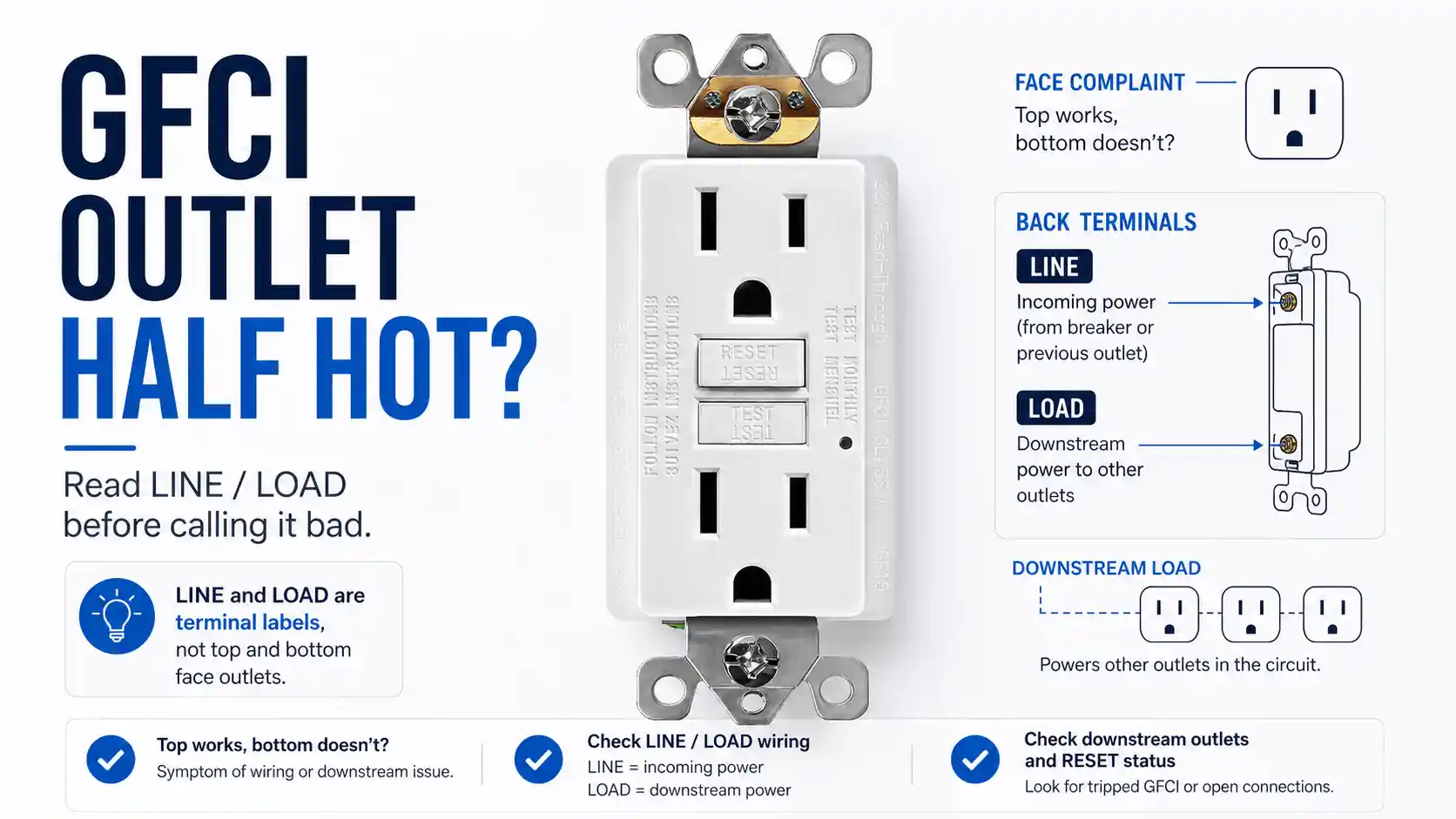
A standard duplex has two slots fed from the same pair of screws, and people read it spatially — top plug, bottom plug. A GFCI borrows that vocabulary, but the wiring underneath is not the same. Both face slots on a GFCI are fed from one internal protected output. So “the top works and the bottom doesn’t” rarely means two slots of the same device disagreeing with each other. They draw from the same source.
More often the sentence is comparing two different things and compressing them into one phrase:
- the GFCI face against a regular receptacle downstream on its LOAD side,
- the front slots against the back terminals someone is probing with a tester,
- the device against the feed coming into the box,
- or a receptacle on a switched circuit, where “half” follows a wall switch and has nothing to do with the GFCI at all.
Take “half hot” literally and the unit goes straight to the bench. It tests clean, ships back, and the dead outlet in the field is still dead — because the words described a circuit, and a bench only sees a device. That round trip is the cost of reading the tag too fast: restocking on a good unit, freight both ways, and a problem that never moved.
The five readings, side by side
Every phrase on the tag maps to one of a small set of failure modes. Here is the routing the desk runs before anything gets an RMA number.
| What the tag says | Failure mode it points to | Mechanism in one line | Can the bench catch it? | Check before the RMA |
|---|---|---|---|---|
| “Green light, no power” on a new unit | LINE/LOAD reversed | Power to the face is denied by design when the feed lands on LOAD terminals (UL 943) | The device’s misfire response, yes; the field wiring, no | Confirm the incoming feed is on LINE |
| “Won’t reset,” brand new | Not yet reset / self-test lockout | A self-test unit needs LINE power present, then a full RESET press | That RESET works, yes; whether LINE power reached it, no | Apply LINE power, press TEST then RESET |
| “Whole group of outlets dead” | Fault or trip on the LOAD side | The visible GFCI is fine; the dead part is downstream of it | The device, yes; the downstream run, no | Test the LOAD-side run and look for a trip |
| “Top works, bottom doesn’t” | Switched leg or two-device comparison | “Half” follows a wall switch, or compares two receptacles | Nothing here — the answer is in the circuit | Confirm what feeds each part |
| “Reset won’t click or hold” | Actual device fault | Mechanical reset failure after wiring and power are confirmed | Yes — reset won’t hold on the bench either | Bench-test after the other four clear |
Four of those five rows resolve in the field, not on a test bench. That ratio is the reason a “dead GFCI” tag is worth thirty seconds of reading before it costs a replacement.
A green light is reporting status, not output
One version of this return: a new unit with a solid green light and nothing coming out of the face. The owner reads the light as a power light, sees no power, and concludes the unit is bad. Three new units behaving the same way only hardens that read — surely not three defects in a row.
Here is where the standard and the instruction sheets line up. Since June 29, 2015, UL 943 has required every new GFCI receptacle to carry a self-test function and a reverse line-load misfire function. What that looks like in the field is spelled out by the makers: Eaton’s slim GFCI ships in a tripped state, and its sheet states that if the line cable is landed on the load terminals, the device cannot reset and will not power the face or the load terminals until the LINE side is wired and energized. Leviton lists line/load reversal as a common reason a GFCI won’t reset or deliver power, affecting both power and protection. A unit wired backward is holding exactly the state those sheets describe.
The behavior also splits by device generation, and most write-ups miss this. An older GFCI wired backward could still power its face — lights on, an appliance running — while quietly not protecting anything, because a real ground fault wouldn’t trip it. A current self-test unit handles the same mistake differently: it denies power and won’t reset until the wiring is corrected. So “green light, no power” on a new device and “everything works but nothing’s protected” on an old one are the same wiring condition reading out through two different designs.
On our line, green means the device has power and is holding, red flags a fault, and a flash is the self-test running. That’s our scheme. UL 943 mandates that a unit indicate its status visually or audibly, but it doesn’t fix a single color code across the industry, so an indicator from one brand can’t be read against the habits of another.
When a return rests entirely on “the light was green,” the light was answering a different question than the one being asked.
When the part that’s missing is downstream
A different tag: the GFCI face is fine, but a whole group of outlets past it went dead. The instinct is to blame the device you can see, because it’s the one with buttons on it.
A GFCI feeds its LOAD terminals out to standard receptacles downstream, and a trip or a fault anywhere on that run drops every outlet wired after it. The dead outlets are supposed to wear a “GFCI Protected” label so the next person knows where the reset lives — and that label is exactly the thing that falls off a wall over a few years. Without it, a dead downstream receptacle looks like an independent failure instead of one end of a protected chain.
This is a wiring read, not a device read, and it’s the same family of conditions covered in GFCI outlet wiring mistakes: line/load and downstream protection. The combo-device version — where USB ports stay alive while the protected receptacle drops — runs on the same line-side versus load-side architecture. Replace the visible GFCI here and the fault is still on the LOAD run; the new unit just trips on the same thing.
If the circuit carries more than one GFCI, the reset that matters may not be the one in front of you.
What the bench proves, and what it can’t reach
Every unit we ship has already been through a hard road before it ever sees a function check. It runs a 12-hour high-intensity vibration cycle that simulates the shaking of transport, then each unit is instrument-tested — trip threshold, TEST and RESET, the indicator, and the reverse line/load miswire response — with a person checking the housing and confirming the reset button clicks and holds. A unit that misfires wrong on the bench, or whose reset won’t hold, doesn’t leave.
That testing proves the device. It does not reach the wall. We test the device on our line; we don’t read the wiring in someone else’s box, and a return tag doesn’t say which pair was the live feed. I can’t tell from a return photo which conductors were the incoming line and which were headed downstream — that part lives in the field, not on the bench.
So the boundary is clean. When a return reaches us described only as “half hot,” “top works bottom doesn’t,” or “green light, no power,” we read it as a LINE/LOAD or downstream condition first, and the unit goes to the bench only after LINE-side power and a clean reset are confirmed where it was installed. A device that already passed reverse line/load and reset-hold testing is the least likely explanation for a face that won’t power, and treating it as the first explanation is what fills a return bin with good units.
Before the unit ships back
The reads that resolve in the field are cheap to confirm and expensive to skip. A few that clear most of these tags:
Confirm the incoming feed is on the LINE terminals with power present — a self-test unit will not reset without it, and o this is the first thing to confirm on a “won’t reset, brand new” tag. Pull the yellow tape only after the LINE side tests live, which is why it ships covering the LOAD terminals in the first place. Check the LOAD-side run and any downstream receptacles for a trip or a missing “GFCI Protected” label before deciding the device is the dead part. If the reset button still won’t click or hold after the feed and wiring are confirmed, that’s the one reading that earns a bench-test.
For a purchase order, the wording that prevents the round trip is plain: state the amperage, TR or WR if the location needs it, the self-test and reset-lockout behavior, and the LINE/LOAD feed-through expectation. A line that says only “GFCI receptacle, 15A” leaves every one of the readings above open to interpretation at the jobsite, and that interpretation can come back as a return.
FAQ
Can a GFCI outlet be half hot?
Not the way a standard duplex can. A regular receptacle’s two halves can be fed from separate hots, but a GFCI’s face slots both draw from one internal protected output, so a “half hot” report on a GFCI almost always describes something else — a switched circuit, a downstream device, or a LINE/LOAD condition.
My new GFCI shows a green light but no power — is it defective?
Usually not, especially if more than one new unit does the same thing. Since 2015, UL 943 requires GFCIs to deny power to the face when the incoming line is landed on the LOAD terminals, and self-test units need LINE-side power present before they will reset at all. Confirm that the feed is on the LINE terminals and that you pressed RESET fully after power was applied. A unit that still won’t reset once the feed is correct and live is the case that points to the device itself.
Why don’t the downstream outlets work after I replaced the GFCI?
Because they’re fed from the LOAD side of that GFCI, and a trip, a fault, or a wiring slip on that run drops all of them together. The dead outlets should carry a “GFCI Protected” label; if it’s gone, they look like separate failures instead of one protected chain.
Does wiring a GFCI backward damage it?
No. Reverse line/load denies power to the face by design; correcting the wiring restores normal operation. The denial is a safety feature, not a fault.
Sources
- UL 943, Standard for Ground-Fault Circuit-Interrupters — standard context for Class A GFCI receptacle performance, self-test / auto-monitoring, and reverse line-load miswire behavior for modern GFCI devices:
UL 943 Standard Information - Leviton Product Support, GFCI Line/Load Reversal — explains that line wires bring power from the electrical panel to the GFCI, load wires carry power downstream, and each set must land on the correct terminals:
Leviton GFCI Line/Load Reversal - Leviton Product Support, What to Do When Your GFCI or AFCI Isn’t Working — line/load reversal as a support-path cause of a GFCI that will not reset or deliver power:
Leviton GFCI or AFCI Isn’t Working - Leviton GFCI instruction sheet PK-A3410-10-00-2B-M-X1 — identifies LINE cable as power from the service panel, LOAD cable as power to downstream receptacles, and the yellow sticker covering LOAD leads before installation:
Leviton GFCI Instruction Sheet - Eaton, Installing and Testing a Slim GFCI Receptacle — instruction sheet requiring LINE cable wires to LINE terminals and LOAD cable wires to LOAD terminals; if LINE wires are mistakenly connected to LOAD terminals, the GFCI cannot reset and will not power the receptacle face or load terminals:
Eaton Slim GFCI Instruction Sheet - Eaton, Installing and Testing a Slim GFCI Receptacle — downstream testing and placement of “GFCI Protected” stickers on receptacles that lose power when the TEST button is pressed:
Eaton Downstream GFCI Protected Labeling - NEC 406.4(D)(2) public summary — grounding-type receptacles supplied through GFCI protection require appropriate “GFCI Protected” and, where applicable, “No Equipment Ground” marking:
NEC 406.4(D)(2) Summary - DIY Stack Exchange, New GFCI outlet green light is on but no power — field example of a new GFCI showing indicator behavior without delivering face power:
GFCI Green Light But No Power Discussion - Mike Holt Forum, Backward Wired GFI — practitioner discussion of line conductors landed on load terminals and the resulting GFCI behavior:
Backward Wired GFI Discussion
Related reading
Before the PO line is closed
Browse the GFCI receptacle line for self-test, TR, and WR options with LINE/LOAD feed-through.